
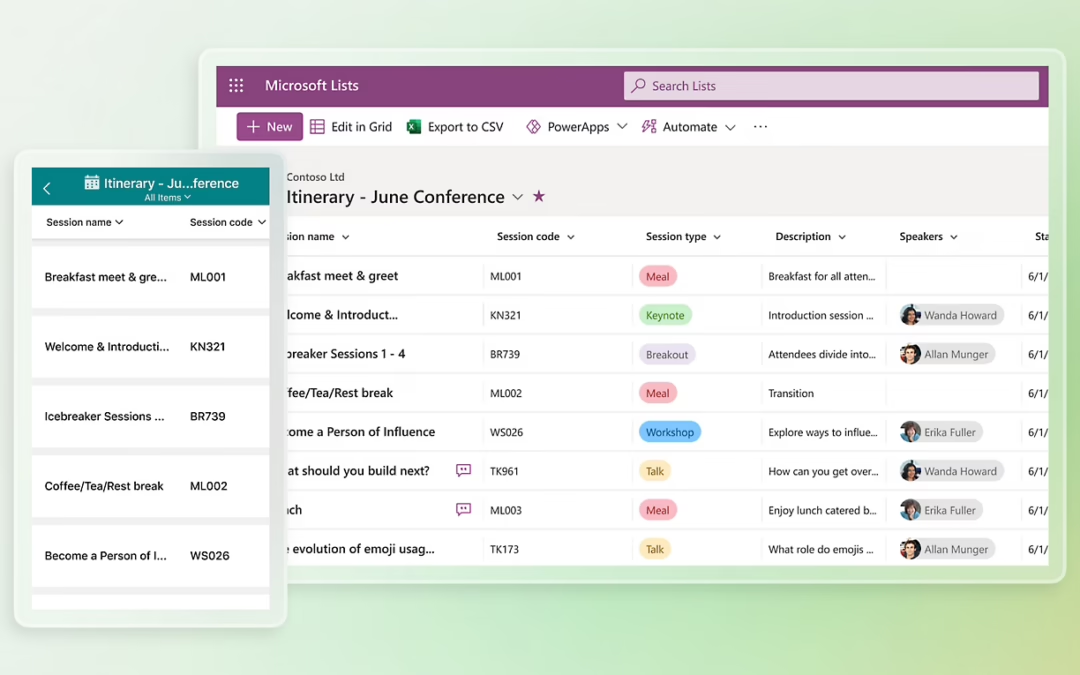
Both these tools are a part of many M365 subscriptions. So how small and medium accounting firms can use each tool effectively?
| A simple way to remember the difference: Microsoft Lists is best for tracking structured information; Microsoft Planner is best for tracking work, tasks, owners and deadlines. |
Quick comparison
| Area | Microsoft Lists | Microsoft Planner | Accounting firm examples |
| Primary purpose | Track records, data and status fields | Track tasks, work allocation and progress | Client registers, onboarding tasks |
| Best unit of work | An item or record | A task | Policy register vs implementation tasks |
| Best for | Registers, trackers, metadata, dashboards | Projects, action lists, campaigns, internal initiatives | Software register vs CRM rollout |
| Strength | Flexible columns, views, filters, structured data | Ownership, due dates, board views, simple collaboration | Compliance register vs partner action plan |
| Typical question | What information do we need to track? | What work needs to be done, by whom, and by when? | Who owns the next step? |
Why firms confuse the two
Both apps sit inside Microsoft 365, both can appear in Teams, and both can help a firm become more organised. That overlap often leads people to assume they do the same job. They do not.
Microsoft Lists is essentially a structured information-tracking tool. It is designed for rows, columns, views, filtering and metadata. Microsoft describes Lists as a way to track issues, assets, routines, contacts, inventory and more across Microsoft 365 and Teams.
Microsoft Planner is a work-management tool. It is designed for tasks, owners, due dates, status and progress. Microsoft now positions Planner as a unified work management experience that brings together task management, team plans and broader project capabilities.
Having made that distinction I track tasks in Lists but on a small scale and it is just me.
What Microsoft Lists is best used for
The easiest way to think about Lists is that each row is a record. That record might represent a client, a recurring obligation, a software subscription, a policy, a supplier, a referral source or an internal process. The columns then hold the details you want to track, such as owner, due date, business unit, service line, status, risk level or review cycle.
For an accounting firm, Lists is a strong choice whenever the firm wants a reliable operational register rather than a task board. It works particularly well for information that needs to be filtered, searched, sorted or reported on over time.
Examples include a client onboarding register, a register of annual compliance reviews, a software licence register, a list of standard operating procedures, a marketing content tracker, a referral partner database, or a register of AI use cases being trialed inside the firm.
What Microsoft Planner is best used for
Planner is better when the real need is to co-ordinate action. Each item in Planner is a task. The focus is on what needs to happen, who owns it, when it is due and whether it is progressing.
In practice, this makes Planner well suited to internal projects and team-based workflows. It is a natural fit for a CRM rollout, a SharePoint migration, a policy implementation project, partner meeting actions, recruitment campaigns, budgeting activities, or a tax planning campaign.
Because Planner presents work visually, many team members find it easier to use for collaborative execution than a spreadsheet or a list. It is not trying to be a database. It is trying to help a team move work forward.
I recall hearing that a couple of small firms were using Planner for job / workflow management.
A practical way to decide
If the process revolves around rows of information and columns of attributes, Lists is usually the better choice.
If the process revolves around steps, deadlines, owners and completion, Planner is usually the better choice.
In many accounting firms, the most effective answer is to use both. For example, Lists can hold the master register of internal initiatives or compliance obligations, while Planner manages the tasks for a specific project or remediation program.
How accounting firms could use Microsoft Lists
Client onboarding register: track client name, entity type, responsible partner, manager, engagement letter status, AML/KYC status, software setup status and current onboarding stage.
Compliance and review registers: maintain annual policy review dates, insurer renewals, cybersecurity checks, quality management reviews, or CPD monitoring items with clear ownership and review cycles.
Internal knowledge and process library: keep a structured catalogue of SOPs, templates, approved AI prompts, workflow guides and policy documents with category, owner and review date fields.
Software and supplier register: record licences, renewal dates, costs, owners, support contacts and business purpose for the firm’s growing collection of apps.
How accounting firms could use Microsoft Planner
Internal change projects: manage the tasks for implementing SharePoint, redesigning the client onboarding process, introducing a CRM, or rolling out a new AI use policy.
Leadership and management actions: track agreed actions from partner meetings, management meetings or strategic planning sessions so tasks are visible and assigned.
Seasonal campaigns: organise pre-30 June tax planning, budget season readiness, or graduate recruitment steps across multiple people and deadlines.
Process improvement work: break a workflow improvement initiative into design, testing, training, launch and review activities.
Common mistakes to avoid
Using Planner as a database. Planner is not ideal for long-lived records with lots of metadata. It becomes clumsy if the real need is to maintain a register.
Using Lists as the main project board. Lists can hold status and due dates, but it is not as natural as Planner for managing execution across a team.
Overcomplicating simple needs. Not every workflow requires specialist practice-management software. For many internal processes, Lists and Planner are more than adequate and may already be included in the firm’s Microsoft 365 environment.
Conclusion
For small and medium accounting firms, the key distinction is straightforward. Microsoft Lists tracks things; Microsoft Planner tracks work.
Lists is the better fit for registers, trackers and structured operational information. Planner is the better fit for tasks, ownership, deadlines and project execution. When firms understand that difference, they can reduce their dependence on spreadsheets and email follow-up, and build clearer, more scalable internal systems using tools they may already have.
Source note
This article reflects Microsoft’s current support guidance on Lists and Planner, including Microsoft’s description of Lists as a tool for tracking information such as issues, assets, routines and contacts, and Planner as a task and work management tool within Microsoft 365 and Teams.
Microsoft Lists App | Microsoft 365
Microsoft Planner | Daily Task and Work Management
If you are using Lists or Planner now I’d love to hear what you are using them for. [email protected]